Planning a Migration

When you migrate data in a safety-critical system, often you aren’t just working on an isolated piece of the puzzle.
Typically, ithe system in question is integrated into processes; directly and indirectly. No one person may have a complete picture of how it is used – it can be hard to judge this.
For example, your public website might seem like “just a contact form”; but if it does any degree of assessing or guiding potential patients; it’s has an indirect relationship to your intake and clinical teams; even if they don’t directly triage your initial enquiries.
Alternatively, another health organisation I worked with modelled license plates in their PAS – seemingly odd data to capture, until you look at the bigger picture of limited parking in the area having become an administrative problem taken on by the care team; so that patients never have to risk a parking fine, vs continued treatment in their particular environment.
Systems grow, and people inhabit them; tailoring their interaction with the tools to the practicalities of the day to day. Knowing this happens, how do you make changes fearlessly?
Mapping the current state
In any data migration, mapping out the core logical data is a great starting point. Obvious areas include patient records, communications, attachments. But what else is there?
Identifiers – for your core patient records, how confident are you there are no or few duplicates? Does your system have strong identifiers, like an IHI? Can records be consolidated with merge tools?
Do your patients attend in a recurring fashion, or are there limits to data retention which relate to your model of care?
Considering these areas, are there areas you can clean up, reconcile, de-duplicate, or enrich ahead of time?
For example, writing off old debtors or classifying/categorising documentation. These activities are often put off until “another day”, but when it comes to transitioning to a new system; suddenly your organisation may find it self crunched into doing a lot of low level cleanup at the last minute.
The more effort invested upfront in data cleansing, often the better the outcomes are – an oft quoted statistic is up to 80% of data migrations being considered a failure. When evaluating the effort to expend here, consider how many benefits of the “new system” would simply be realised or partly realised by having a clear, consolidated set of records. Chances are, you will get a lot of the benefits you seek from a new system, simply by improving your existing data or data handling experiences.
Often, a vendor can assist in the data cleansing phase; but always ensure adequate backup strategies and review are in place for anything beyond hand editing efforts
Find the touch points between systems and teams
Information often changes shape at the boundary between teams, sometimes because of the needs of a system. For example, when a patient is admitted the information about them is often distilled into a wristband – it serves a clinical purpose and part of a safety protocol around identification; but it is also not the full picture of who a patient is, why they are admitted. It is a lot easier to recognize these format shifts when it is a physical artifact (wristband, label, patient chart), while an electronic system can obscure some of this – if I can see X, surely team Y can see Z!
Examine the way information flows “backwards” in your processes. IE: If an alert or allergy is subsequently identified, how does this information get back from the clinical setting to the core electronic record? Is it retained or relevant for subsequent admissions? Would a person handling a subsequent enquiry be aware of risk? (eg self harm, violence)?
Map out where information flows in a “linear” fashion. Examine where there are changes in responsibility between teams – does a discharge team at the end of the process often have to refer to information from the pre admission care planning; even if their specific role is focused on post-treatment and transition to community support?
Write it down
This is to a degree self evident, but an area people struggle with. Use tools like an FMEA to document your data – where it is used, why it is used, and the consequences of it being incorrectly or incompletely migrated.
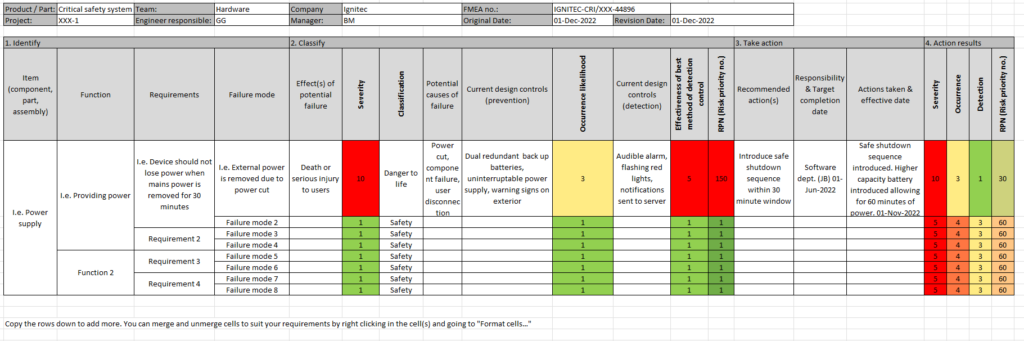
Plan out your fall back strategies – can you refer to the old system in a read only fashion? Can you run both side by side? What other mitigations are there to reduce harm or consequences of failure? Do you have sufficient backups? Do the people involved have the authority to call it off if its clear it’s not working?
The point of tools like this is not to have all of the answers immediately; but to help illicit this list of known unknowns – things you can predict will go awry and plan form; vs unknown unknowns – those “uh oh” moments when you realise you didn’t consider a particular area.
While risk cannot be completely eliminated; going through a process where you map out the responsibilities of your entire team, the vendor and more; plus high level action plans if it does not work out as expected go a long way towards ensuring success.
Much like a fire drill, planning and simulation can have a significant benefit in decreasing risk.
Hard cut over? Or incremental change?
Evaluate carefully how much information can be migrated in an ongoing fashion, with new tools and systems used in a read only fashion.
This works best for information at the “edge” of a process – invoices, outbound communication, notifications – anywhere with limited “write back” to the main data repository.
Where possible, prefer this style of migration over a longer period. There are some drawbacks for users, referring to dual information sources; but it allows you to pilot the new system in a limited fashion and gather feedback. If your users are constantly defaulting back to the old system due to lack of information; this highlights an implicit gap in your data migration strategy – but also lets them get on with the job.
Often, as PAS/EMR systems are write intensive; vendors do not want to go down this pathway – they want a clean cutover with a limited window for feedback; where failure to object or request help with data cleansing means they can escape the consequences. Its “not their job” to clean up your records.
By preferring a slower, phased migration with replication of information; you can often structure data migration to iron out these problems – a botched migration simply means starting over with a fixed approach, and your source of truth remains the old system. You can set contractual goals around qualitative measures, which define success – ie: 80% of clinicians do not have to refer to a legacy system for areas X, Y, Z.
If you do need to do a hard cut over, define the success criteria for the data migration as clearly as you can – and write these into both project level and if possible, contractual level goals.